


Last Updated on October 26, 2026 by Domenica
- How to Transfer Money from Chase to Another Bank Using Zelle
- 1. Open Your Chase Bank Mobile App or Head to Chase.com
- 2. Click on Pay and Transfer
- 3. Click Send Money with Zelle
- 4. Read the Disclaimer About Scams and Click Accept
- 5. Send Money with Zelle
- 6. Enter in How Much You Want to Send
- 7. Select the Account You Want the Funds to Come From and the Transfer Date
- 8. Confirm Your Payment and Send Away
- How to Transfer Money from Chase to Another Bank Using External Transfers
- How to Transfer Money with Chase to Another Bank Using ACH Transfers
- How to Transfer Money from Chase to Another Bank through Wire Transfers
- How to Transfer Money from Chase to Another Bank using a Third-Party App (Venmo, Paypal, Cash App)
- More Useful Articles About Banking with Chase
Sending money to your friends, family, or business partners is easier than ever. Chase Bank leads the charge in mobile and online banking, making transfers within or outside of Chase a breeze.
There are five separate ways to transfer money from Chase to another bank:
- Zelle – the best way to transfer money to a friend or family member who has another U.S. based bank account.
- External Transfers – best for transferring money to yourself from Chase bank to a bank account you have somewhere else.
- ACH Transfers – the system behind external transfers and direct deposit, and work for domestic transfers only.
- Wire Transfers – usually meant for very large or international transfers, like buying a house or sending money abroad.
- A third-party app like Cash App or Venmo – best to transfer money from Chase to a friend whose bank isn’t supported by Zelle
How to Transfer Money from Chase to Another Bank Using Zelle

Zelle is free, typically moves money within minutes between enrolled users, and is built into the apps of most major US banks and credit unions.
If you bank with Chase and are looking to send a friend, family member, or anyone with a major American bank some money, Zelle should be your first choice.
To sign up with Zelle, all you have to do is login to your Chase Mobile App or Chase.com and hit pay and transfer. From there, click either pay with Zelle or request money with Zelle.
Zelle will then onboard you. It’s a quick process that only takes a couple of clicks. Importantly, this is the part of the process where you will select your “username”.
Zelle doesn’t have usernames like Cash App’s $cashtags. Instead, it will ask you to use either a phone number or email.
If you’ve never used the transfer app before, it’s simple.
Here’s how it works:
1. Open Your Chase Bank Mobile App or Head to Chase.com
You can use Zelle on both Chase’s mobile app and their website. The steps below use the mobile app. Either way, log in with the same login and password you use whenever you want to head into your mobile banking.
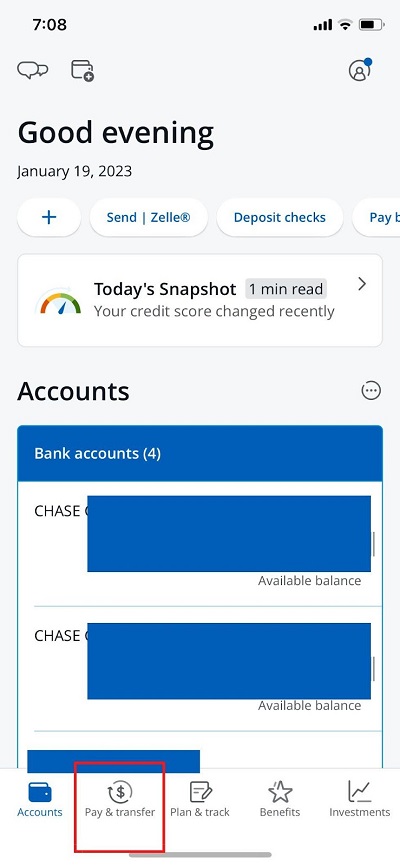
2. Click on Pay and Transfer
Towards the bottom of Chase Bank’s app is a series of five buttons, each guiding you to another portion of the app. Click on pay and transfer, it’s the second from the left.
3. Click Send Money with Zelle
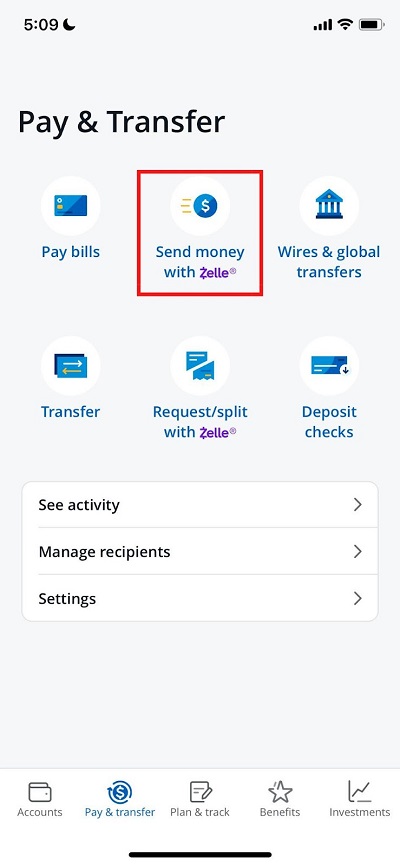
There’s also a button to request money with Zelle. If someone owes you some funds, you can send a handy request their way.
All they would have to do is hit accept and the funds would be transferred.
If you’re looking to send money though, look for the button that is helpfully titled send money with Zelle.
4. Read the Disclaimer About Scams and Click Accept
If you’ve never used Zelle before, Chase will give you a brief page about watching out for scams. Zelle payments are usually final once sent. Banks on the Zelle network may reimburse certain imposter scams — for example, if someone posing as your bank or a government agency tricked you into sending money — but most other scams aren’t covered.
For this reason, be sure you know exactly who you’re sending money to. Once you’ve read and understood the disclaimer, click accept.
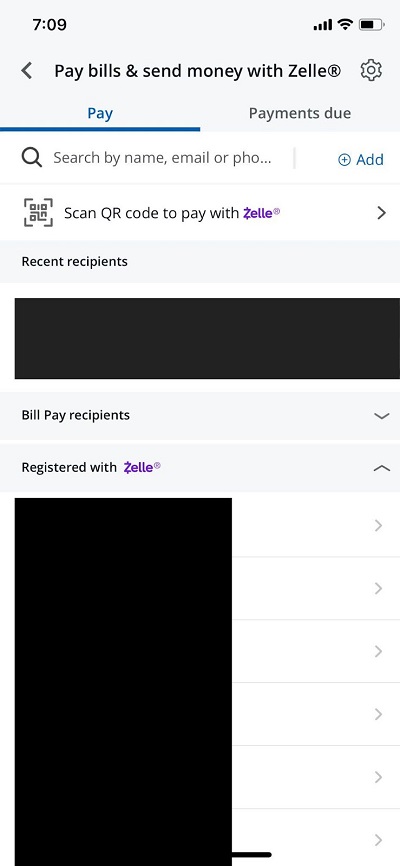
5. Send Money with Zelle
Again, if you’ve never used Zelle before, Chase will ask you for permission to access your contacts.
If you hit accept, they will load all of the contacts you have saved in your phone and let you know which ones are already on Zelle.
If you don’t want Chase to have access to your contacts, no worries. You can always find your recipient-to-be on Zelle by entering in their email or phone number, whichever they have attached as their “username”.
You can also use a QR code to receive funds or send them as well.
6. Enter in How Much You Want to Send
Enter in the dollar amount you want to send.
Chase sets your Zelle limit based on your account, and your available limit appears on this screen. There’s also an option to add a memo, if you so choose.
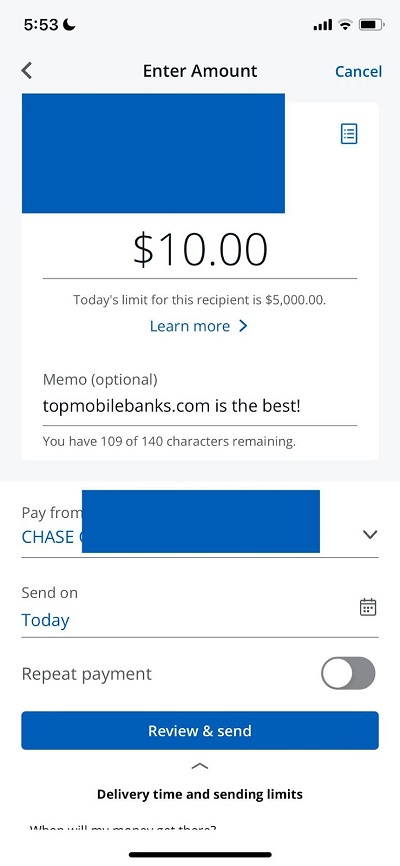
7. Select the Account You Want the Funds to Come From and the Transfer Date
If you have multiple accounts with Chase Bank, now is the time to choose which account you’d like the funds to come from.
Chase only lets you select from your checking accounts you have with them.
You can also schedule transfers in the future, and you can set them to repeat. This is a handy feature for anyone who pays the same amount in rent every month.
If you owe $1,000 every first of the month, you can choose to schedule a repeating transfer and never worry about being late again!
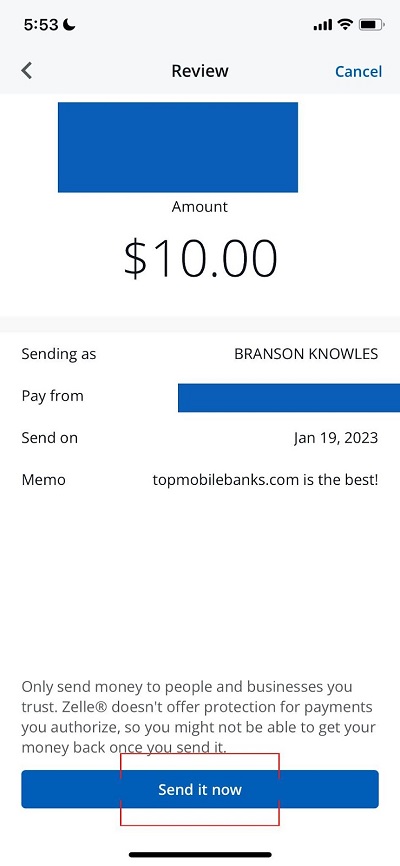
8. Confirm Your Payment and Send Away
The last screen you’ll see before sending your payment is the review screen. Make sure you have the right recipient, dollar amount, and account you’re sending from.
Once everything looks good, click send it now. Your funds should be in your payee’s account right away.
Zelle is available through more than 2,300 banks and credit unions across the United States, making it one of the fastest and easiest to use ways to transfer money with Chase to another bank!
How to Transfer Money from Chase to Another Bank Using External Transfers
External transfers are the best way to send money to yourself if you have accounts at different banks. You can also use external transfers to send money to your friends or family, but Zelle works much better.
To transfer money with Chase to another bank using external transfers, you again need to head to your Chase mobile app or Chase.com. Using the mobile app as our example again, swipe left on the account you want to use for your external transfer.
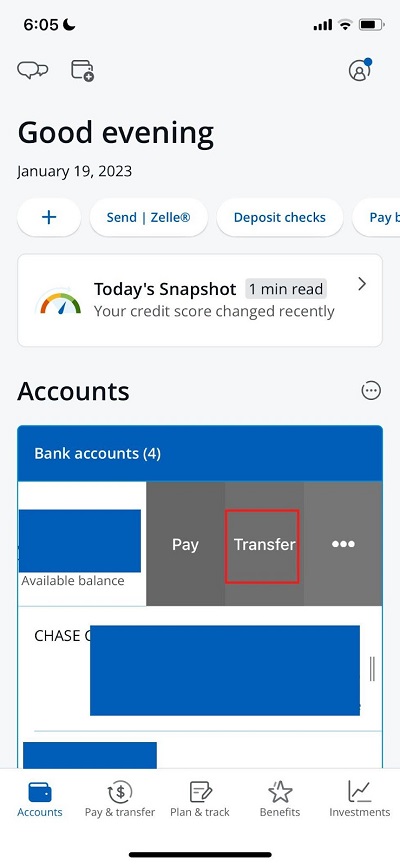
You’ll see three buttons here: pay, transfer, and three dots giving you more options. The Pay button is also a shortcut to Zelle.
Click transfer and then click manage external accounts when the menu gives you more options.
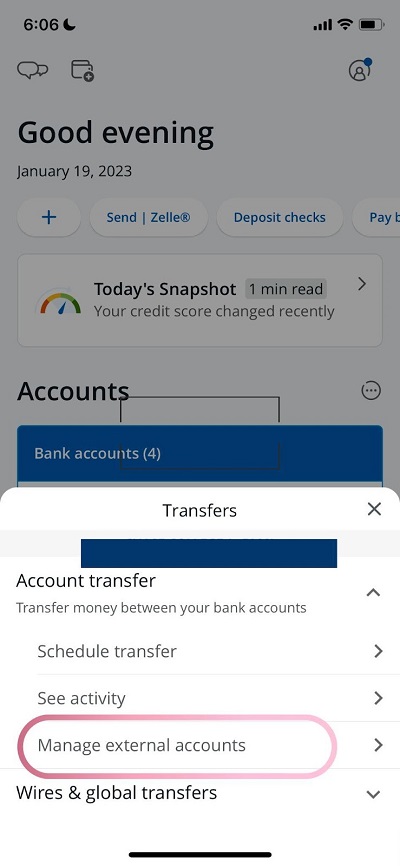
Chase will then present you with a screen detailing their external transfers, letting you know it may take 2-3 business days to complete your transfer, and that they can only use accounts based in the U.S.
Click add an external account. From here, Chase will show you a list of popular American banks you can pick from. If the account you want to set up for external transfers isn’t appearing, you can look for it in Chase’s search bar.
Chase will then give you another screen, verifying you want to set up external transfers. Click that you agree to their rules, and then click next.
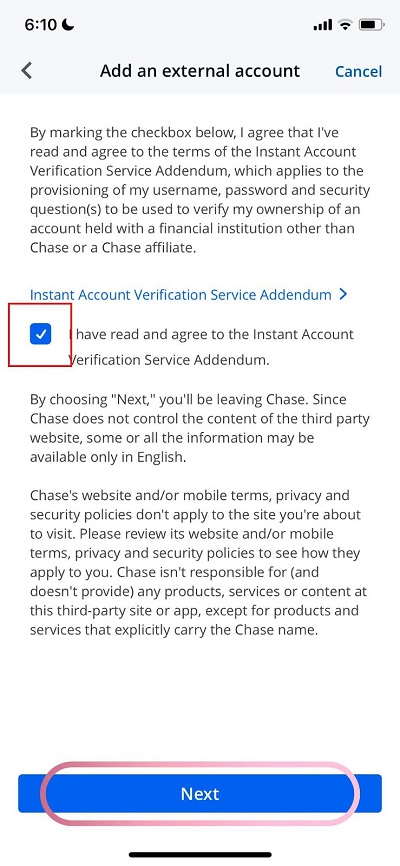
Chase will pop-up with one more screen verifying you want to leave their site to head to another — your secondary bank’s site.
From there, you’ll login to your other bank’s site and begin to connect the accounts.
How Do I Set Up External Transfers with Chase Bank and Another Bank?
Before Chase Bank will allow you to send and receive money from another one of your accounts, they’ll want to verify they’ve got the right one.
Chase verifies your external account in one of two ways. Many banks support instant verification when you sign in with your other bank’s username and password. Otherwise, Chase sends two small trial deposits (each under $1) and one withdrawal for the same total. Once they appear in your other account — typically within 2–3 business days — return to Chase and confirm the deposit amounts to finish setup.
Chase sets your external transfer limit based on your account and history, and shows your daily limit when you schedule a transfer.
How to Transfer Money with Chase to Another Bank Using ACH Transfers
ACH (Automated Clearing House) is the network that powers most bank-to-bank transfers in the US, including direct deposit, bill payments and Chase’s external transfers. When you send money to another bank through external transfers, you’re already using ACH.
ACH transfers only work between US bank accounts. To send money internationally, use a wire transfer (see below) or Chase Global Transfer, which sends money in local currency to 60+ countries.
Chase doesn’t charge a fee for standard ACH external transfers, which typically take 1–3 business days. Chase sets your daily limit based on your account, and you’ll see it when you schedule the transfer.
How to Transfer Money from Chase to Another Bank through Wire Transfers
Like ACH transfers, you probably aren’t sending money to another bank too often through wire transfers. Wire transfers are almost always used for either very large domestic or international transfers, well exceeding the $25,000 ACH limit.
Some foreign banks only accept wires and do not allow ACH transfers — another reason to use them.
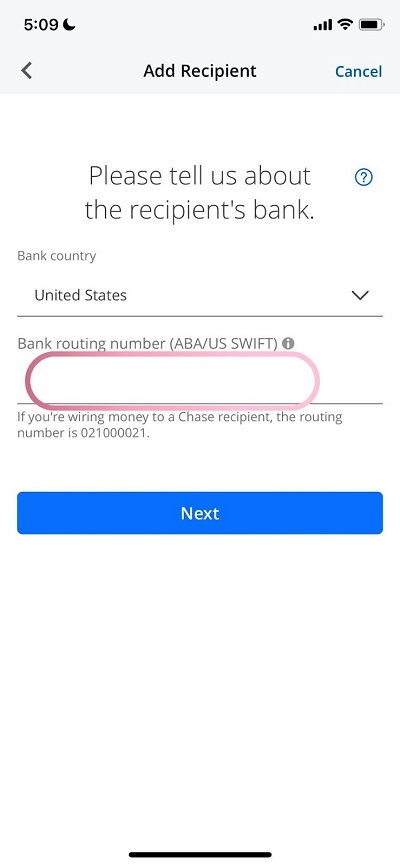
You can now send both domestic and international wires from the Chase Mobile app or chase.com.
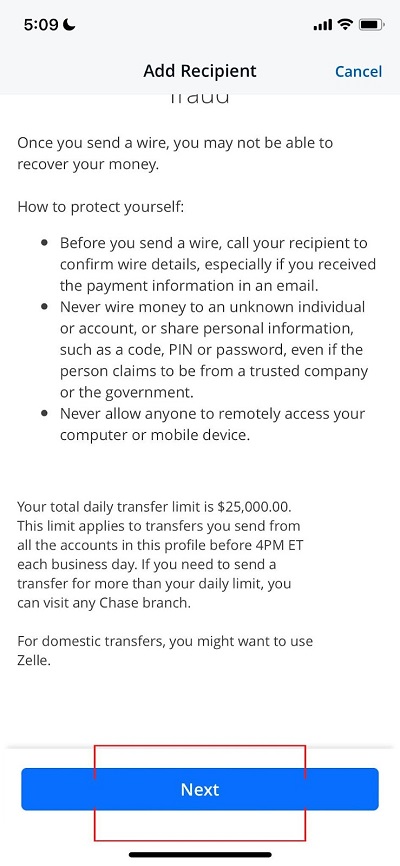
On the app, there’s even a screen with disclaimers warning you about the dangers of sending a wire transfer. Read through it before clicking next.
International wires sent online in foreign currency cost $5, or nothing for amounts of $5,000 or more.
Chase wants their customers to be as independent as possible, and encourages them by offering discounts on wires sent from the mobile app or the website.
If you send a domestic wire in person at a Chase branch, they will charge you $35 whereas it only costs $25 to send a domestic wire by yourself. It costs $15 to receive a domestic wire. It costs $15 to receive an international wire as well.
International wires sent in US dollars cost $40 online or $50 in a branch.
What Do I Need to Receive an International Wire Transfer with Chase Bank?
To receive an international wire, give the sender your account number and Chase’s SWIFT code: CHASUS33. (Some forms ask for an 11-character version, CHASUS33XXX.) For a domestic wire, provide your account number and Chase’s wire routing number, 021000021.
You may need to give your name and address to whoever is sending you the money as well.
How to Transfer Money from Chase to Another Bank using a Third-Party App (Venmo, Paypal, Cash App)
Zelle isn’t the only popular peer-to-peer (P2P transfer platform out there. Many of Chase’s customers use a separate third party app as well, apps like Venmo, Paypal, or Cash App.
If you want to send money to a friend whose bank doesn’t support Zelle, this may be a good option for you.
To start this process, login to your money transfer app and add either your Chase Bank Debit Card or your account and routing number. The app will be able to pull funds from either.
Next, find your friend or whoever you plan on sending money to. Enter in the amount you want to send and the third party app should pull funds from Chase automatically.
These apps usually don’t do any verification with Chase, so make sure you enter your account information correctly. Also, make sure nobody gets ahold of your account info for this very reason, they could use it to send their friends money through these third-party apps.
More Useful Articles About Banking with Chase
- Chase Bank Name and Address (How to receive Direct Deposits)
- 9 Reasons Why Chase May Have Locked or Frozen Your Account
- How to Deposit Checks on Chase App
- 7 Ways to Deposit Money into Your Chase Account
- How a Non-US Citizen Can Open a Bank Account at Chase Bank
- What Happens if Your Chase Account is Negative For Too Long