



Last Updated on September 28, 2026 by Domenica
- How to Receive Direct Deposit with Chase Bank through a Form (Given to You by Your Banker)
- How to Receive Direct Deposit from Chase Bank through a Form (Given to You by Your Employer)
- How to Receive Direct Deposit through Chase Bank by Giving Your Employer Your Information
- How to Receive Direct Deposit through Chase Bank by Using the Chase Bank Mobile App
- How Do I Split Up My Direct Deposit into Different Accounts?
- What Address Do I Use For Chase Bank to Receive Direct Deposit?
- More Useful Articles About Banking with Chase
Chase Bank is one of the most popular banks around. Its direct deposit feature makes getting paid that much easier.
If you want to receive direct deposits with Chase Bank, you have four ways to do so:
- You can ask your banker for a direct deposit form
- Use the one your employer gives you and have a banker help fill it out
- Give your employer your account and routing number verbally
- Use the Chase Bank Mobile App and fill out a direct deposit form yourself
If your direct deposit form asks for a bank name, use Chase’s official legal name: JPMorgan Chase Bank, N.A. Chase doesn’t require you to use a bank address on your direct deposit forms.
The fastest method is usually to create the direct deposit form yourself. The Chase Bank Mobile App allows you to print it out or send it by email, saving you a trip to the bank and to your job.
If you’re new to Chase Bank or are planning on opening your account with them, your banker can print out a form for you during account opening. Two birds, one stone!
Each way is as applicable as the last, so take your time reading through them so you can decide for yourself on the best way to receive a direct deposit with Chase Bank!
How to Receive Direct Deposit with Chase Bank through a Form (Given to You by Your Banker)
When you open your account with Chase, your banker will ask if you’d like a direct deposit form. The form comes pre-filled with all of your account information, including your account number, routing number, name, and address.
If you already have an account with Chase and have switched jobs, you might need a new direct deposit form for your new employer.
To get a new form, simply head down to your local branch and ask to speak with a banker. If they’re busy, the associate bankers (a.k.a. tellers) will be able to print one for you as well.
Here’s what a Chase direct deposit form looks like:
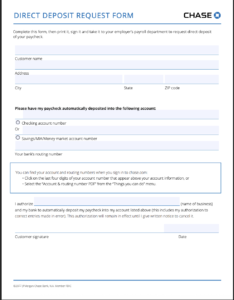
As you can see, the direct deposit form your banker can print has all the information your employer will need.
It includes:
- Your full legal name as it appears on your account
- Your address
- Social security number
- Routing and account numbers
Chase offers this as a free service too — both the direct deposit form and the ability to deposit directly as well.
Give this form to your employer, signed and dated, and they should be able to put your paychecks into the account of your choosing automatically.
It may take a couple of pay cycles though, so be prepared to receive one or two more paper checks before seeing your wages in your checking account without you having to make a deposit.
How to Receive Direct Deposit from Chase Bank through a Form (Given to You by Your Employer)
Some companies require their employees to fill out one of their forms.This is common with larger corporations. They don’t accept Chase’s direct deposit form as they have their own.
If your employer’s HR department prints you a direct deposit form and you need help filling it out, your Chase banker will be more than happy to. It will only take a minute or two, but Chase bankers are almost always busy, so it’s best to set an appointment before you head in.
Sometimes, employers want to confirm the actual Chase Bank employees helped fill out the form, that way they can ensure your direct deposit paperwork has the right information on it.
Chase Bank has a special stamp for this very reason. It’s a stamp that usually has the branch’s location and address on it and can be signed by a Chase employee.
Due to fraud, Chase employees are more reluctant than ever to sign off on your paperwork. They’re still willing to stamp your direct deposit form though, so it varies based on the branch you go to.
If your employer doesn’t need your banker’s verification on the direct deposit form, you can fill it out yourself by using the Chase Bank Mobile App.
How to Receive Direct Deposit through Chase Bank by Giving Your Employer Your Information
Some workplaces don’t require you to fill out an entire direct deposit form. Small businesses may just ask for your account details directly. Many larger employers use online payroll portals like ADP, Paychex, Gusto or Workday, where you enter your routing and account numbers yourself.
If you fall into this category, all you have to do to find your account information is login to the Chase Bank Mobile App and click on the account you want to receive direct deposit in.
From there, click show details in the account details screen. That will show you your account and routing number, all your employer needs to use to set up your direct deposit.
If they need your address, make sure you give them the same one you give Chase. If they need an address for Chase, use your local branch’s.
How to Receive Direct Deposit through Chase Bank by Using the Chase Bank Mobile App
This is often the fastest and easiest way to set up direct deposit with Chase. You don’t have to print a form, head to the bank, or ask your boss for a direct deposit sheet.
All you have to do is follow these two easy ways to get your direct deposit form:
Pre-filled for you:
- Log in to the Chase Bank Mobile App
- Click on the prefered checking or savings account you want to receive your direct deposits
- Choose ‘Manage Account.’ If you’re on chase.com, go to ‘More’ and ‘Account Services’
- Click or tap on ‘Set up direct deposit form’
- Download, print, or email the form to your employer
Complete the form yourself:
- Download the PDF
- Find your 9-digit routing and account numbers. ( Sign into Mobile App –> Tap your account tile –> Click ‘Show details’
- Fill in your other personal information (name, address, etc.)
- Once everything’s filled out, send over to your employer
How Do I Split Up My Direct Deposit into Different Accounts?
Some people don’t want to deposit 100% of their paycheck into the same account. Splitting up your direct deposit can be a good choice for anyone looking to send some of their paycheck to their savings without having to do it themselves.
There are two different types of paycheck splits: by dollar amount, and by percentage. It’s up to you how you want to split your deposits.
Either way, to split your direct deposit you’ll need to include both of the account numbers and routing numbers you plan on using on your direct deposit form.
You can include either a percentage or a specific dollar amount next to each form, telling your employer exactly how much you want going to either account.
What Address Do I Use For Chase Bank to Receive Direct Deposit?
This is one of the most common direct deposit questions. In the past, you’d often need to include your bank’s headquarters address on your direct deposit form.
Now, you usually don’t need an address at all. Your routing and account numbers tell your employer’s payroll system exactly where to send your pay, and funds typically arrive on payday. If a form asks for the bank name, use JPMorgan Chase Bank, N.A.
If your boss or employer wants an address for Chase Bank though, use your local branch’s. If you opened your account online on your own, use the nearest, local, physical branch.
You can find a branch by using the Chase Bank Mobile App. Scroll to the bottom of the home screen. You’ll find a section called “visit us”. Within that section is a button titled “ATM and branch”.
More Useful Articles About Banking with Chase
- 7 Ways to Deposit Money into Your Chase Account
- How to Deposit Checks on Chase App
- 9 Reasons Why Chase May Have Locked or Frozen Your Account
- How to Change Name on Chase Bank Account
- 4 Ways to Transfer Money Using Routing and Account Numbers
- 6 Ways to Check Chase Card Balance