


Last Updated on September 30, 2026 by Domenica
Visa gift cards are a popular gift around the holidays. Many people want to use them with PayPal, which raises a common question: can you transfer money from a Visa gift card to PayPal?
The short answer: Not directly. PayPal doesn’t let you move a gift card’s balance into your PayPal balance or withdraw it to a bank account. You can link a Visa gift card to PayPal as a payment method, the same way you’d add a debit card, and then use it to shop online or send money.
PayPal accepts prepaid gift cards from Visa, Mastercard, American Express and Discover. They must be “open-loop” cards that work anywhere the network is accepted, not store-specific gift cards.
Linking a gift card to PayPal is free. However, PayPal charges a fee if you use a card to send money to friends and family (2.9% + $0.30 for domestic payments). The gift card itself may also carry fees from its issuer, so check the card’s terms.
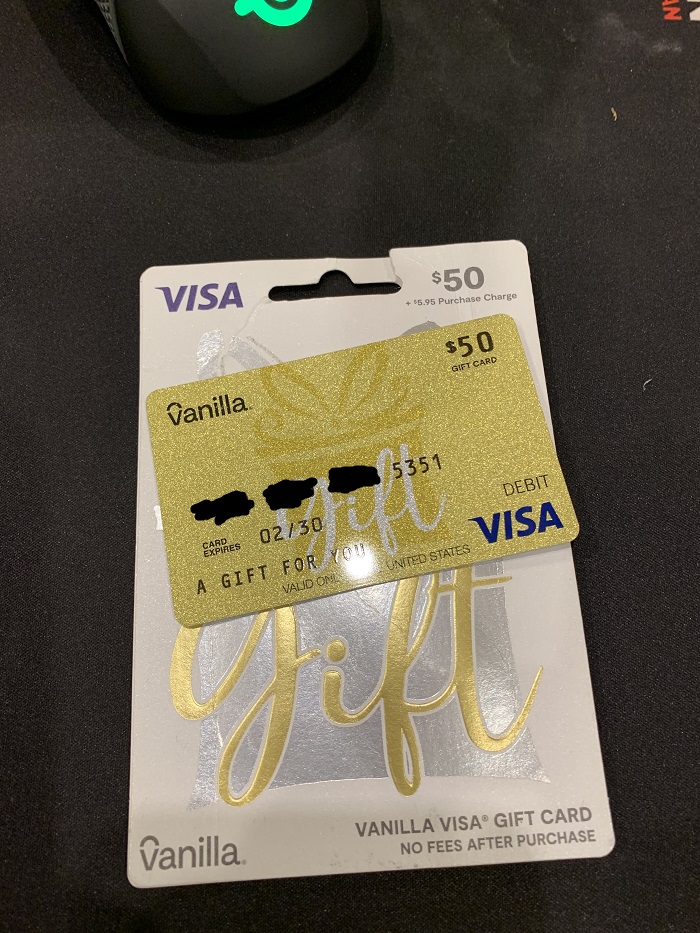
How to Add a Visa Gift Card to PayPal (Step by Step)
If you’ve just received a Visa Gift Card and want to use the balance but don’t want to add yet another card to your already bulging wallet, you’re in luck.
Here’s how to link your Visa gift card to PayPal:
1. Check your card’s balance and billing details: Confirm the card is activated and has enough balance. Some gift cards require you to register a name and ZIP code with the issuer before using them online. Others let you use your own address. Check the issuer’s website (listed on the back of the card). A billing mismatch is the most common reason PayPal declines a gift card.
2. Open the PayPal app or go to paypal.com and sign in. To transfer the money, you have to link it from within Paypal.
3. Head to the Wallet section: The Paypal app has five icons on the bottom of the screen, each representing a different section of the app. Click on the wallet to add the Visa Gift Card to Paypal.
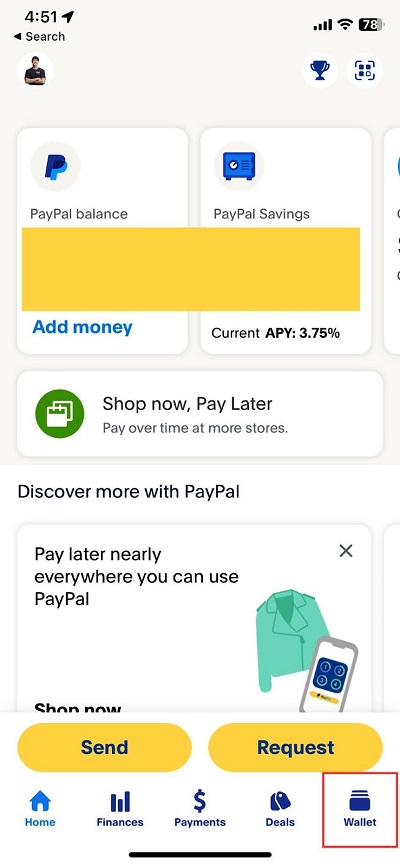
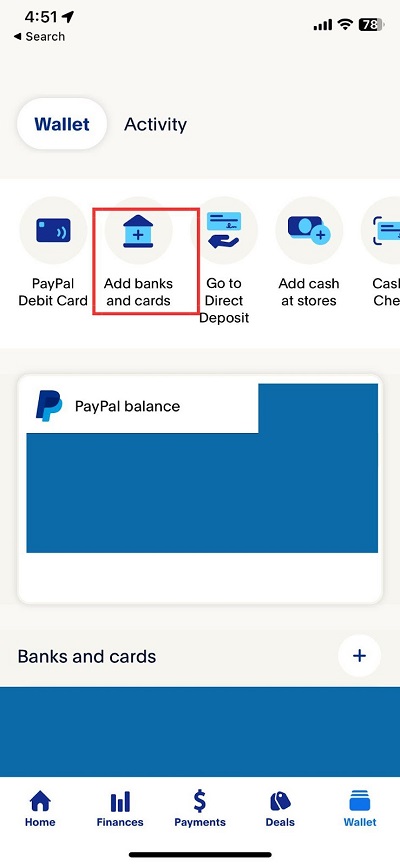
The “add banks and cards” button will then ask if you want to add from a bank, debit or credit card, or through an Amex Send Account. Click debit or credit cards.
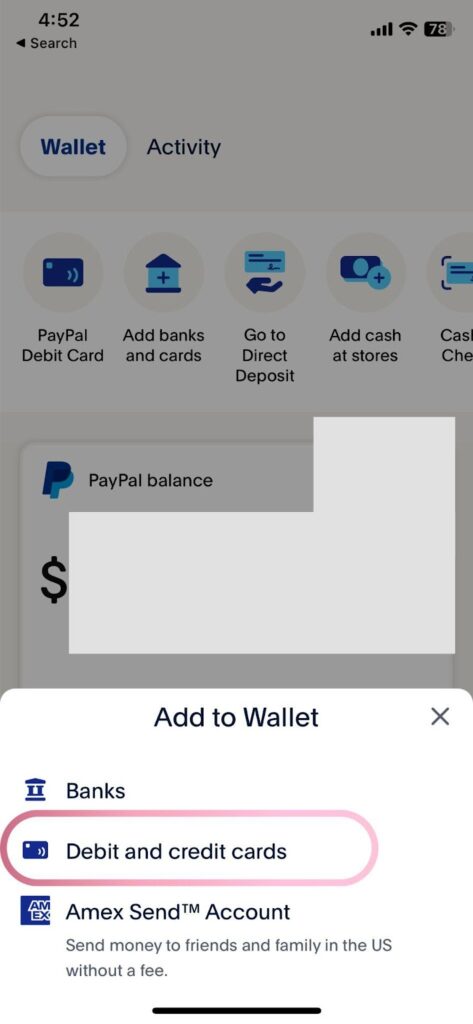
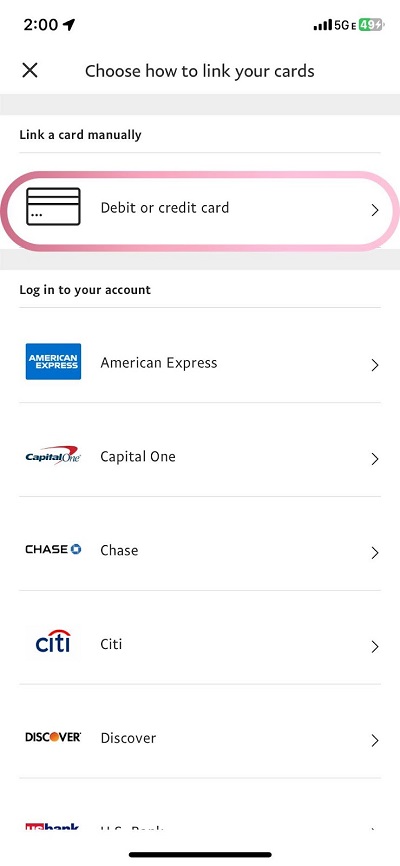
Unfortunately, they do not have a way to link your card through a website operated by Visa. You can, however, add your card manually. To add your card, you’ll begin by adding your card number to Paypal.
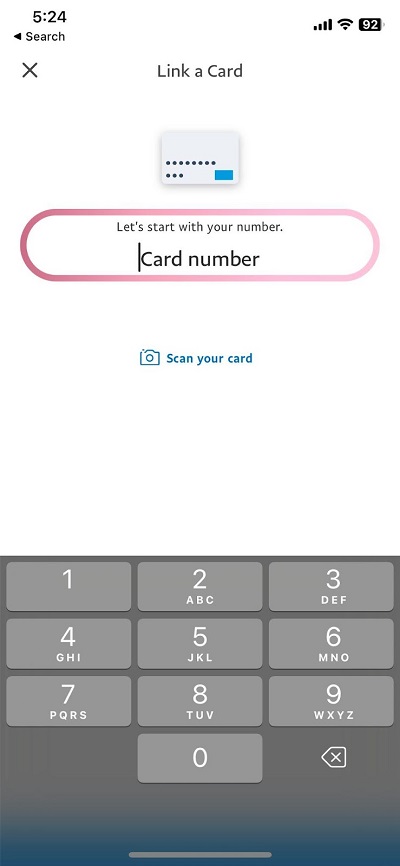
Then you’ll enter in the security code as well as the expiration date. You may need to scratch off some film to see the security code. Once your card is linked, you’re almost done.
6. Use the card for payments: Once linked, your gift card appears in your PayPal Wallet as a payment method. Select it at checkout or when sending money. PayPal doesn’t allow split payments, so the card balance must cover the full purchase, or PayPal will use your backup payment method for the difference.
You can also transfer a balance from a Visa Gift Card to Paypal when you’re checking out with Paypal. If you’re making a purchase with the hugely popular finance platform, you can actually add a Visa Gift Card to your balance at checkout.
If you’re not a Paypal member but are still making a purchase through them, you can enter the Visa Gift Card’s information the same way you would any credit or debit card.
You can use Visa Gift Cards for anything on Paypal that isn’t a recurring transaction. Because gift cards have a limited balance, Paypal doesn’t want to rely on them for transactions that may go on for longer than their balance can afford.
If you use a Visa Gift Card through Paypal and ever see that your transaction has been declined, it could be due to insufficient funds. Check your balance through Visa, and if everything looks good try again or contact Paypal support.
Can You Use a Prepaid Gift Card to Send Money to Someone on Paypal?
If you have a PayPal account, you can select a linked prepaid gift card as the payment method when sending money to someone. Note that card-funded personal payments carry a fee (2.9% + $0.30 for domestic payments), and some gift card issuers block money transfer services entirely. You can’t send money to someone on Paypal with a gift card without having a Paypal account yourself though.
PayPal accepts prepaid Visa, Mastercard, Discover and American Express gift cards as payment methods.
Why Can’t I Use My Visa Gift Card on Paypal?
The most common cause is a billing address or ZIP code mismatch. If your card’s issuer requires registration, register a name and ZIP code on the issuer’s website and use the same details in PayPal. Some issuers also block PayPal and other money transfer services in their terms, so check the cardholder agreement.
There may be a couple of different reasons why you can’t use your Visa Gift Card on Paypal. If you linked the card but forgot you already used the gift card somewhere else, you may not have enough to cover what you wanted to add to Paypal.
You also may have entered the numbers wrong when adding the card. Paypal lets you scan the card to add the card’s numbers for you, but if you entered it manually you could have typed in the wrong number or the wrong expiration date.
Not all Visa Gift Cards can be added to Paypal. Only vanilla gift cards can be added, meaning gift cards to no store in particular. If you have a Visa Gift Card that is supposed to go to a store or restaurant, you won’t be able to add it to your Paypal balance.
Can You Transfer a Gift Card Balance To Your Bank Account Through Paypal?
No. PayPal doesn’t allow you to move a gift card balance into your PayPal balance, so there’s no way to send it on to your bank account. Prepaid gift cards also can’t be cashed out at a bank.
The best way to use your full balance is to spend it: link the card to PayPal for online purchases, or use it directly anywhere Visa is accepted. If you have a small leftover amount, some retailers let you split a purchase between your gift card and another payment method at checkout.