



Last Updated on October 27, 2026 by Domenica
Users can easily transfer money between Easypaisa and NayaPay with a few steps. Both mobile banking apps are simple and have interactive user interfaces to perform transactions.
Digital banking is growing fast in Pakistan. In January 2025, Easypaisa became the country’s first licensed digital retail bank, operating as Easypaisa Bank Limited. NayaPay, meanwhile, is licensed by the State Bank of Pakistan as an Electronic Money Institution (EMI) — a regulated digital wallet rather than a bank.
Here’s how to transfer money from Easypaisa to NayaPay and back.
How to Transfer Money From Easypaisa to NayaPay
Users can easily send money from Easypaisa to NayaPay via the Send Money option of the app, which uses the Inter Bank Funds Transfer service.
Making money transfers from Easypaisa is simple and extremely convenient.
Telenor users who use USSD versions of Easypaisa have limited access to funds transfer and banking services, which is why this method is not preferred.
Here, I will only chalk out the steps from money transfer via the Easypaisa digital banking app.
The steps below use the Easypaisa app.
- Log in to your Easypaisa account and click on the “Send Money” option.
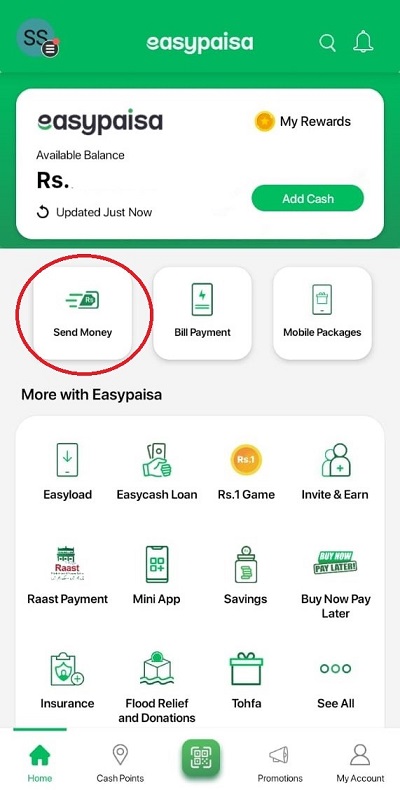
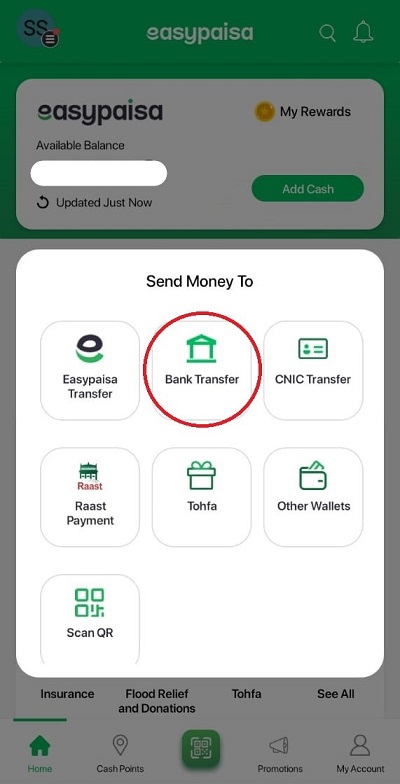
- Click on “Bank Transfer”
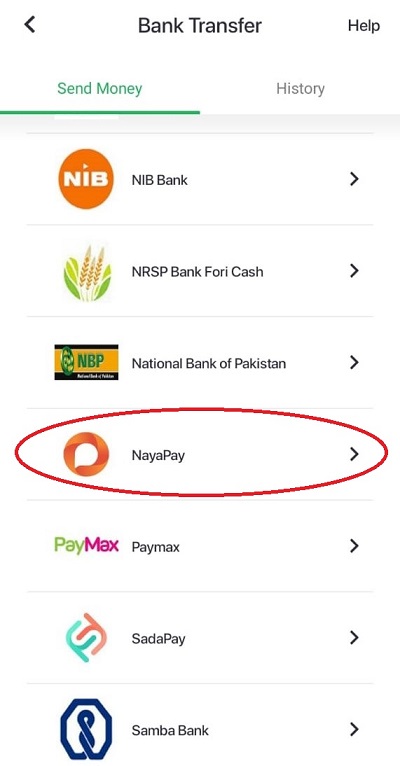
- Scroll down the list to find the NayaPay digital wallet option and click it.
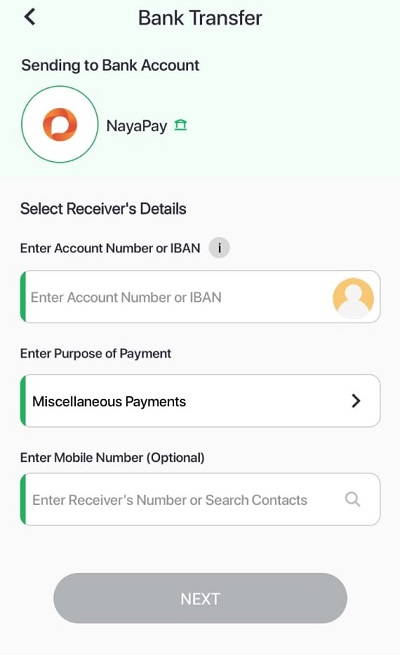
- In the next step, enter the Account Number or IBAN of the NayaPay account. Select the purpose of payment from the list (If you are unsure of the purpose, leave it at “Miscellaneous Payments”). You can also provide the receiver’s mobile number, but this is optional. Click on Next
- Now, enter the amount you wish to send to the NayaPay account. Click on Next
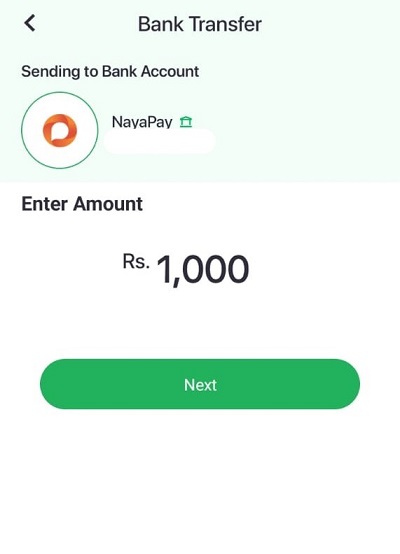
- Verify the information provided and click “Send Now” once satisfied.
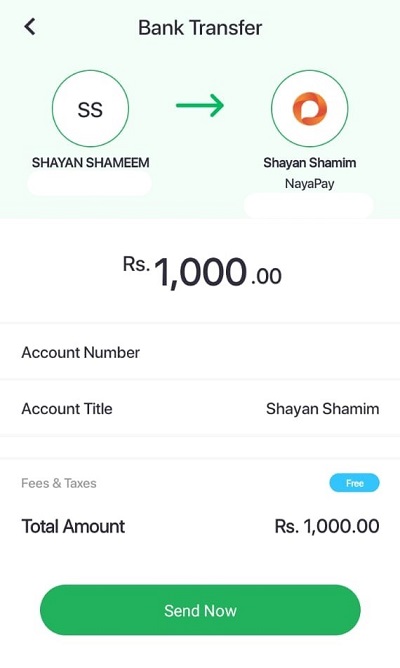
You will receive a text message and an email from the Easypaisa app on your registered number and email indicating the successful transfer of funds.
How to Transfer Money From NayaPay to Easypaisa
You can easily transfer money from NayaPay to an Easypaisa account via the Send Money option. Transfers are free up to Rs. 25,000 per month, with a small fee above that (see the fees section below). Transfers through Raast are always free.
NayaPay is a relatively new entrant to Pakistan’s digital banking and wallet sector.
The app has fewer users than other giants such as Easypaisa and JazzCash.
However, it has attracted the attention of investors and internet banking customers due to its superior international payment processing system.
To transfer funds from your NayaPay account to Easypaisa, follow these steps.
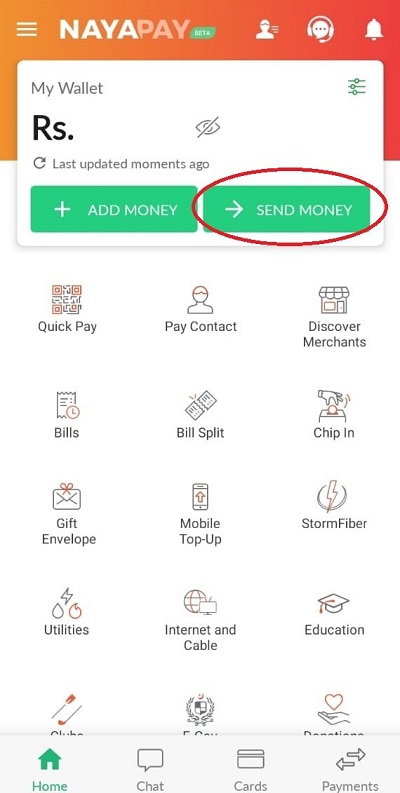
- Log in to your NayaPay app and click on the “Send Money” icon on the homepage.
- In the next step, tap “Any Bank Account” if you haven’t linked your Easypaisa account to NayaPay. If you have, tap “Linked Bank Account.”
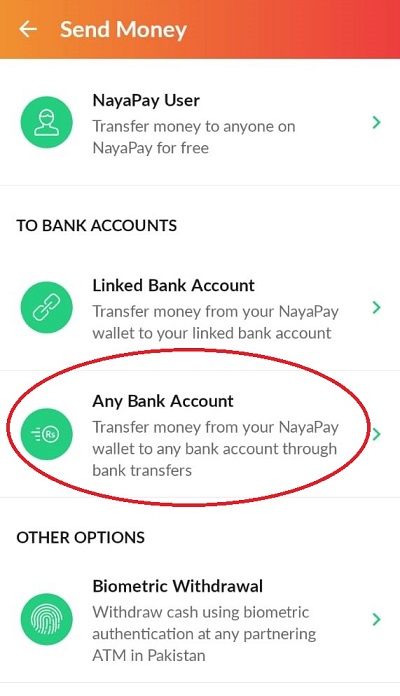
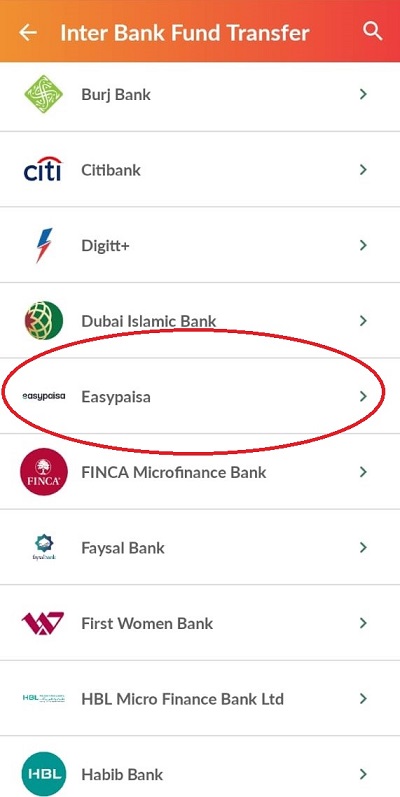
- Scroll down the list and select Easypaisa from the list of available banks.
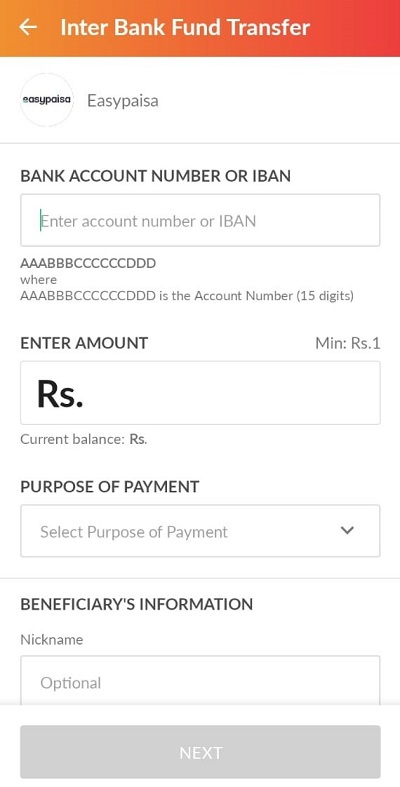
- Enter the bank account number or the IBAN of the receiving Easypaisa account. Enter the amount you wish to send from the current balance (can be seen under the entered amount). Select the purpose of payment from the drop-down list (select “Miscellaneous Payments” if unsure). You can also choose to save the beneficiary account by adding a nickname and selecting the “Save this as new beneficiary” option below. Click on Next
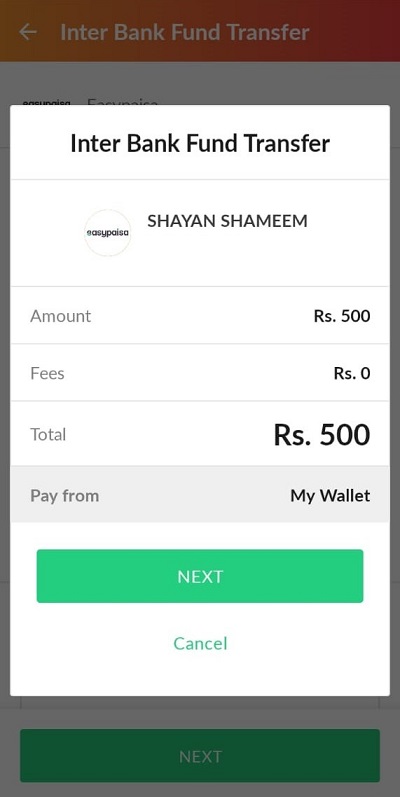
- Verify the details – account title and account number, and click on “NEXT” to proceed.
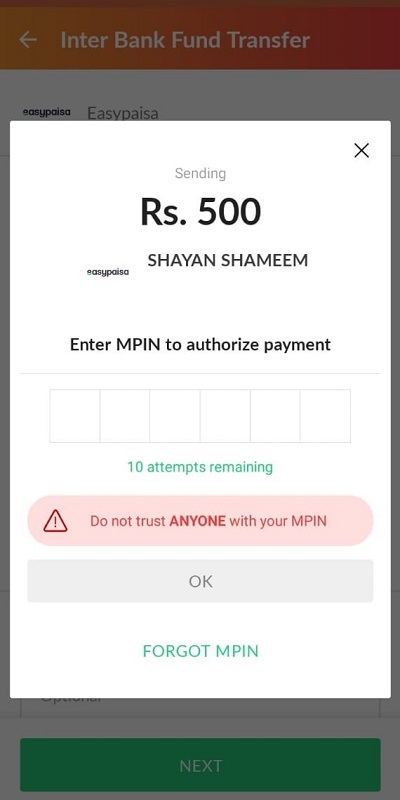
- You will be asked to enter your MPIN or verify the transaction via biometric verification.
Once your transaction is verified, you will receive a prompt of successful transaction and an email at your registered email address.
Which One Is Better – Easypaisa or NayaPay?
Though NayaPay is better for international payments, Easypaisa is a full-fledged digital account offering a one-stop solution to all banking needs.
Easypaisa has been operating in Pakistan since 2009, making it the oldest mobile banking service in the country.
NayaPay, founded in 2017, became Pakistan’s first licensed Electronic Money Institution in 2021.
NayaPay and Easypaisa are two of the country’s most popular digital banking apps.
Some of the major features of Easypaisa and NayaPay are listed in the table below.
| Features | Easypaisa | NayaPay |
|---|---|---|
| Bank Transfer | Yes | Yes |
| Mobile Top-ups and Packages | Yes | Yes |
| QR Payments | Yes | Yes |
| Bill Payments | Yes | Yes |
| Merchant Payments | Yes | Yes |
| Government Payments | Yes | Yes |
| Ticketing Services | Yes | No |
| CNIC Transfer | Yes | No |
| Donations | Yes | Yes |
| Bill Split Payments | No | Yes |
| Payment Request | Yes | Yes |
| Biometric Withdrawal | Yes | Yes |
| Debit Cards | Yes | Yes |
| International Payments | Yes (Visa card) | Yes (Visa Card) |
| Virtual Debit Card | Yes – 500 PKR (Visa Online / Virtual card fee) | Yes – Free |
| Savings | Yes | No |
| Insurance | Yes | No |
| Discounts | Yes | No |
| Buy Now Pay Later (BNPL) | Yes | No |
NayaPay is a popular choice for international and bill payments.
NayaPay allows users to split bills between NayaPay users, which is a useful tool if several people want to contribute to bill payments.
NayaPay virtual Visa debit card is excellent for international and online payments as it provides better exchange rates and fewer service fees compared to the newly launched Easypaisa Visa debit card.
Both NayaPay and Easypaisa now charge upfront issuance fees for their physical debit cards, though neither charges a recurring annual fee.
However, Easypaisa holds major advantages in several areas, such as ticketing and CNIC transfer options which are extremely useful features for mobile payments in Pakistan.
Are There Any Charges for Transferring Money Between Easypaisa and NayaPay?
Under State Bank of Pakistan rules, Inter Bank Funds Transfers (IBFT) are free up to Rs. 25,000 per month per account.
Above the specified limit, 0.1% of the transaction amount or a maximum of Rs. 200 will be charged per transaction to the sending party as a service fee.
Since Easypaisa and NayaPay use IBFT transfer services for money transfers to one another, the same schedule of charges applies to any transactions via these platforms involving IBFT.
Incoming transfers are always free, and transfers through Raast don’t count toward the IBFT limit.
How to Transfer Money via RAAST Instant Payment Service?
The State Bank of Pakistan launched Raast, the country’s first instant payment system, in January 2021, and added person-to-person transfers in 2022. Raast transfers are free by SBP order.
Users of any digital banking service or app can create a RAAST ID on their preferred bank account to receive funds from anyone throughout the country.
The RAAST ID is linked to your mobile number, which serves as the bank account number, eliminating the need to remember long IBANs.
The biggest advantage of Raast is that it’s free, with no monthly free-transfer quota like IBFT. Your bank or wallet’s own transaction limits still apply.
There are also no minimum transaction limits, meaning users can transfer as low as Rs. 1 via the service.
Users can easily create their RAAST ID by logging in to their digital banking app and authenticating their bank account to their mobile number via the RAAST option.
The ID will be instantly confirmed, and users will be able to send and receive funds from anyone in Pakistan.
Conclusion
Easypaisa and NayaPay are excellent digital banking services in Pakistan, empowering the masses and paving the way for a digital revolution in the country.
Users can easily transfer their money between Easypaisa and NayaPay accounts via a few finger taps.
The limit for free IBFTs is Rs. 25,000 per month; a meager fee is charged above this.
Each app offers features the other doesn’t: Easypaisa offers a broader range of banking services, while NayaPay stands out for international payments.
Users can also use the RAAST payment service to transfer funds electronically to any bank account from their Easypaisa or NayaPay accounts free of charge.
More useful guides:
- 5 Easy Ways to Deposit Money in Your Easypaisa Account
- JazzCash or Easypaisa? (The Two Largest MFBs in Pakistan)
- Foreigners Cannot Use Easypaisa (What Are The Alternatives?)
- 5 Possible Reasons Why Easypaisa Is Not Working (How to Fix)
- 4 Possible Reasons Why Your Easypaisa Account Is Suspended
- Does Easypaisa Work Internationally? (All The Answers)